Live
  1. Tired of managing Stripe invoices? just passed Don't get banned from Stripe for #5 on Best products for saving more money.
  2. Tired of managing Stripe invoices? is making a move.
  3. BuyMicroStartups just passed Mealime for #7 on Best products for saving more money.
  4. BuyMicroStartups just caught its first spark.
  5. Don't get banned from Stripe is making a move.
  6. Momentum is building behind Headroom.
  7. Mealime just passed Tyrodesk for #7 on Best products for saving more money.
  8. Mealime just caught its first spark.
  9. YNAB is making a move.
  10. Trendle is gaining speed.
Activity
Free ai model economics tool

Compare AI Model API Costs

Compare the monthly API cost of current AI models. Use your request volume, token sizes and expected prompt caching.

No account requiredNo API keys neededReviewed August 1, 2026
Open the plain-text guide
Monthly workload

Describe the API traffic

Models to compare

Prices refresh hourly from the OpenRouter public model catalog. Estimates exclude provider discounts, taxes, and tools not listed in token pricing.

Your model comparison will appear here

Compare the same workload without treating lower cost as equal quality.

How to use

How to compare AI model costs

  1. 1

    Describe the monthly workload

    Enter request volume and average input and output tokens.

  2. 2

    Choose the models to compare

    Select current text models from the refreshed public catalog.

  3. 3

    Review the estimated bill

    Compare monthly and per-request cost alongside each context limit.

Why this matters

Choose a model with real numbers

A low per-token price can still produce a large bill when outputs, repeated context, and request volume grow.

For editors and agents

Cite this tool accurately

Use the canonical page and this short description when you reference the tool. The plain-text guide keeps the method and limits easy to read.

AI Model Cost CalculatorCompare the monthly API cost of current AI models. Use your request volume, token sizes and expected prompt caching.

Guide

Plan an AI API budget
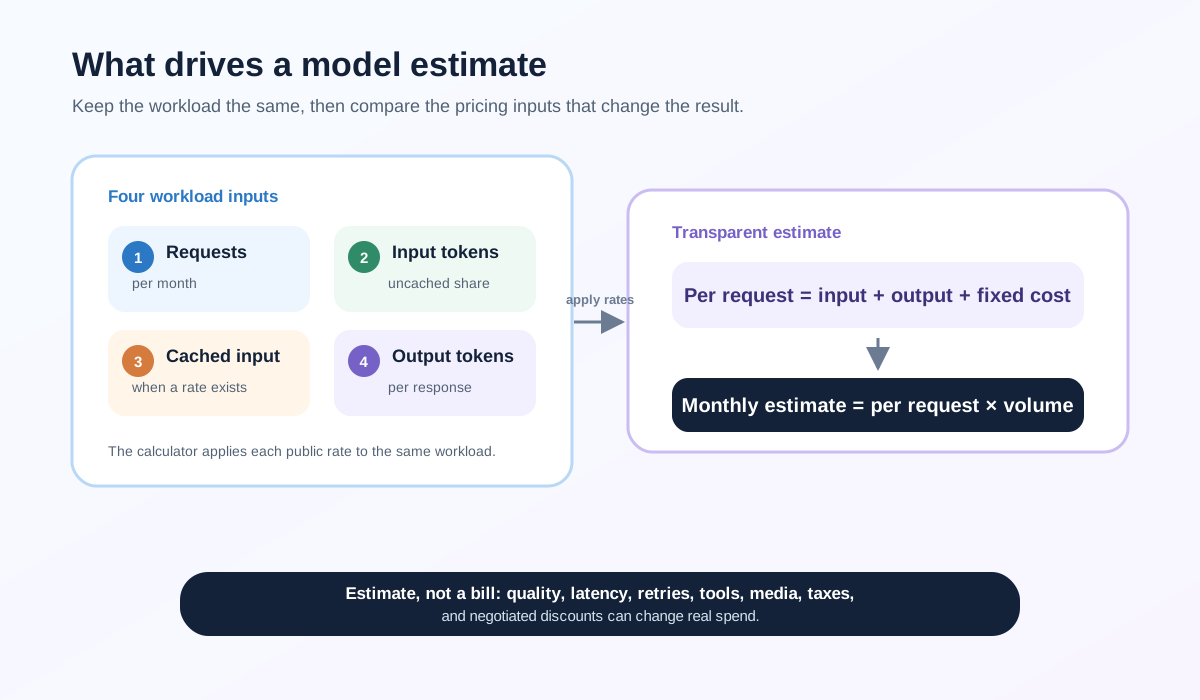
A diagram showing requests, input tokens, cached input, and output tokens flowing into a transparent AI model cost estimate.
Original Mydentify method: hold the workload constant, apply each public rate, and treat the result as an estimate rather than a provider bill.

Compare the same workload fairly

Every model receives the same request and token assumptions so the price difference stays readable.

Include repeated prompt caching

Cached input can cost less when a model publishes a cache-read price. The calculator uses normal input pricing when it does not.

Test quality before switching models

Published prices cannot tell you whether a model is accurate, fast, reliable, or suitable for your users. Run workload-specific evaluations before changing production traffic.

Questions

Questions about AI model pricing

Where do the model prices come from?

The calculator refreshes the public OpenRouter model catalog hourly.

Does this require an API key?

No. You only enter workload assumptions.

How is monthly cost calculated?

The tool multiplies per-request input, output, cache, and fixed request prices by monthly request volume.

Does the cheapest model work best?

Not necessarily. Cost does not measure quality, latency, reliability, or policy fit.

Are provider discounts included?

No. Contract discounts, free tiers, taxes, and negotiated prices are not included.

Why might my real bill differ?

Actual tokenization, reasoning, tools, retries, images, audio, and provider billing rules can change the final charge.